Design system is a UX term. Figma, tokens, component libraries — that’s the world it comes from. But the concept belongs to technical writers too, and if you don’t have one, you’re rebuilding the same decisions every time you start a project.
Here’s what I mean by a technical writing design system: a single reference that captures your voice and tone rules, your content patterns, your formatting standards, your word and term decisions, and — if you’re an independent writer or a small team — your brand. Not a style guide in the traditional sense, though it includes that. A system. Something structured enough that another writer (or an AI tool) could pick it up and produce work that sounds like you.
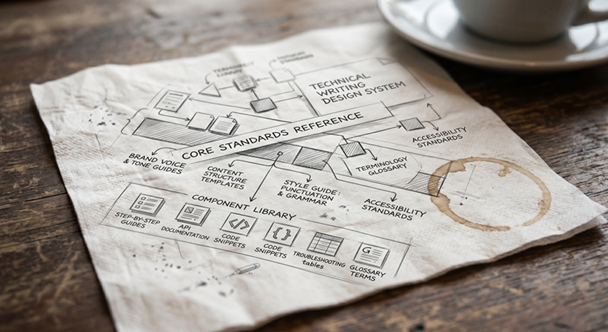
I built one recently using Claude, starting from nothing but my own website. This is how that worked, and how you can do the same. You can see the sample design system at Green Mountain Docs — Design System.
Why You Need One
It’s straightforward once you list the reasons:
Consistency is invisible until it breaks. When your documentation is consistent — same heading logic, same callout style, same terminology for the same concept — readers don’t notice. When it’s inconsistent, they notice immediately, even if they can’t articulate why. A design system makes consistency the default instead of the result of effort.
Decisions made once stay made. How do you handle numbered lists versus bullets? What level heading gets a procedure title? Do you use “click” or “select” for UI interactions? Every writer answers these questions on every project. A design system answers them once, permanently, and takes them off the table.
AI tools need it more than you do. This is the part that’s changed recently. When you use Claude, ChatGPT, or any LLM to help draft or review documentation, it produces output calibrated to general writing conventions, not your conventions. Without a system to hand it, every AI-assisted session starts from scratch. With one, you paste your design system into the project context and the tool works in your voice, at your standards, from document one. A design system is how you govern AI output rather than just accept it.
It’s a client-facing asset. For independent writers and consultants, a design system demonstrates process maturity. It’s the difference between saying “I write consistently” and showing a client exactly what that means.
What Goes in a Technical Writing Design System
Based on how I’ve built mine — and on what I’ve seen matter most across projects — I’d organize it into five areas.
Voice and tone. The governing principles for how your writing sounds. Not vague directives like “be clear” or “sound professional,” but specific, operational rules: active voice over passive; present tense for procedures; second person for user-facing instructions; first person for opinion and analysis. Include a register table — how your voice shifts across contexts (client documentation, blog posts, LinkedIn, release notes) — and a vocabulary list of preferred terms and their rejected alternatives. Number rules, Oxford comma, sentence case: the small decisions that add up.
Content patterns. Reusable templates for document types you produce regularly. A procedure template. An API endpoint reference template. A release notes format. An error reference entry. These aren’t rigid forms — they’re starting structures that handle the architecture decisions so you can focus on the content. Each pattern should include required sections, optional sections, and a brief note on when to use it.
Formatting rules. Heading hierarchy. List logic (when to use numbered versus bulleted, and how to introduce both). Code block conventions. Callout types (note, warning, tip, caution) with definitions for when each applies. Table standards. Link conventions. UI element formatting. Beyond the mechanical rules, this section is also where you embed guidance on things most style guides skip: avoiding terms that age poorly (currently, new, soon), writing for a global audience, and inclusive language — replacing ableist terms and deprecated technical language like master/slave or blacklist/whitelist with precise, neutral alternatives. These rules are tedious to write but extremely valuable. They’re where documentation inconsistency most commonly lives.
Word and term list. A house-style term dictionary that resolves the questions a broader style guide leaves open. The key is establishing a hierarchy: your decisions first, then a recognized external guide (I use the Google Developer Style Guide), then a standard dictionary (Merriam-Webster). Every entry shows the preferred form, what to avoid, and why. This section earns its weight in two ways. First, it gives you somewhere to put client-specific terminology — terms that apply only to one engagement and shouldn’t bleed into other work. Second, it gives any AI tool you hand this document a precise, unambiguous vocabulary list to work from. A terms-to-avoid table with reasons is especially useful here: it’s not just don’t use “leverage” as a verb, it’s use “build,” “apply,” or “use” instead, because “leverage” is almost always replaceable with something more concrete.
Brand tokens. For independent writers and small teams, this means your color palette, typography choices, and spacing standards, documented as reference values. This section is most useful if you’re producing documentation that carries your own brand — proposals, sample documents, website content — or if you want your AI tools to produce output that fits your visual standards as well as your writing standards.
How to Build One with Claude
The practical process takes a single session if you approach it with the right inputs.
Step 1: Gather your existing signals. Claude can’t read your mind, but it can read your work. Collect the things that reflect your current practice: your website copy, a few samples of documentation you’re proud of, any style notes you’ve written down, and the URL of any site that represents your professional brand. These are the raw material.
Step 2: Tell Claude the scope. Before asking it to build anything, be explicit about what you want covered. The five areas above are a good starting point, but you may want to add or remove sections. You should also decide upfront whether this system covers your client work only, your own content (blog, social), or both — the rules differ enough across those contexts that mixing them without labels creates confusion. Tell Claude what the deliverable format should be: a Markdown reference document, an HTML living doc, or both.
A prompt that works well:
“I want to create a design system for my technical writing practice. Here’s my website: [URL]. I want it to cover voice and tone, content patterns, formatting rules, a word and term list, and brand tokens. It should apply to both client documentation and my own content. Base the formatting rules on the Google Developer Style Guide where I haven’t specified otherwise, and use Merriam-Webster as the dictionary fallback. Deliver it as both an HTML document and a Markdown file.
Ask me any questions where you are uncertain or need more information. Make suggestions for more references or sample content.”
Step 3: Answer the clarifying questions. A good session will include Claude asking you to make decisions before it drafts anything. Those questions are doing real work — they’re forcing you to articulate preferences you may have held implicitly for years. Answer them specifically. Vague answers produce vague systems.
Step 4: Review the output against your actual work. A design system generated from a website and a brief is a first draft, not a final answer. Check it against documentation you’ve actually produced. Where does it prescribe something you don’t do? Where does it miss something you always do? Mark those gaps and send them back as corrections.
Step 5: Put it to work immediately. The fastest way to test and refine a design system is to use it. Paste it into your next Claude Project as context material. Apply it on your next documentation task. The gaps and imprecisions become obvious fast, and each correction makes the system more accurate to how you actually work.
What You End Up With
A design system for technical writing is not a bureaucratic artifact. It’s a decision log — a record of how you think about documentation, made explicit and reusable. Once you have it, you stop making the same micro-decisions on every project. You stop re-explaining your preferences to every AI tool. You have something concrete to hand to a client who asks about your process, or to a collaborator who needs to match your voice.
It takes one session to build a working draft. The return compounds from there.